- Docs
- Getting started
Connect a wallet
Connect a browser wallet or a phone wallet to the KerbTape terminal.
The terminal needs a wallet to sign orders for your Hyperliquid account. Prices, charts and the book work without one, so you can look around first.
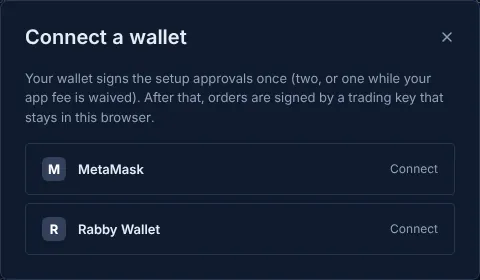
On a computer#
- Install a browser wallet if you don't have one, such as MetaMask or Rabby. Reload the terminal after installing it.
- Press Connect at the top right of the terminal. The sheet lists every wallet your browser has. Pick one and approve the connection in the wallet.
- Check the address. The top bar shows the connected address. That address is your Hyperliquid account: the same one you would use on Hyperliquid's own site.
If no wallet is found, the sheet says so and offers WalletConnect when it is available, so you can connect a phone wallet by scanning a QR code.
On a phone#
A phone browser has no wallet of its own, so there are two ways in:
- Open the page inside your wallet app. The sheet lists links that open this same page in the in-app browser of MetaMask, Coinbase Wallet, Trust Wallet, OKX Wallet and Phantom. Your link, and any order you had started, come with you. For other wallets (Rabby, Rainbow, Zerion…) press Copy link and paste it into the wallet app's browser.
- WalletConnect. When it is available the sheet shows a WalletConnect row. It opens a pairing link for your wallet app; approve there and come back.
If WalletConnect can't connect
The sheet then says Phone wallets can't connect right now. Open this page in your wallet app's browser instead. Use the wallet-browser links above. See Troubleshooting.
What connecting does and doesn't do#
- Connecting only shares your address with the page. It signs nothing and moves nothing.
- To trade you then sign the one-time setup (two signatures, or one for Founding members while their fee is waived). After that, orders are signed by a trading key in your browser, without wallet pop-ups.
- An empty account opens the funding sheet by itself after you connect.
Updated . These pages describe what the product does. They are not investment advice and say nothing about where any price goes next.