- Docs
- Getting started
One-time setup
The fee approval and the trading key: what you sign once, why, and the one-signature case for Founding members.
On this page
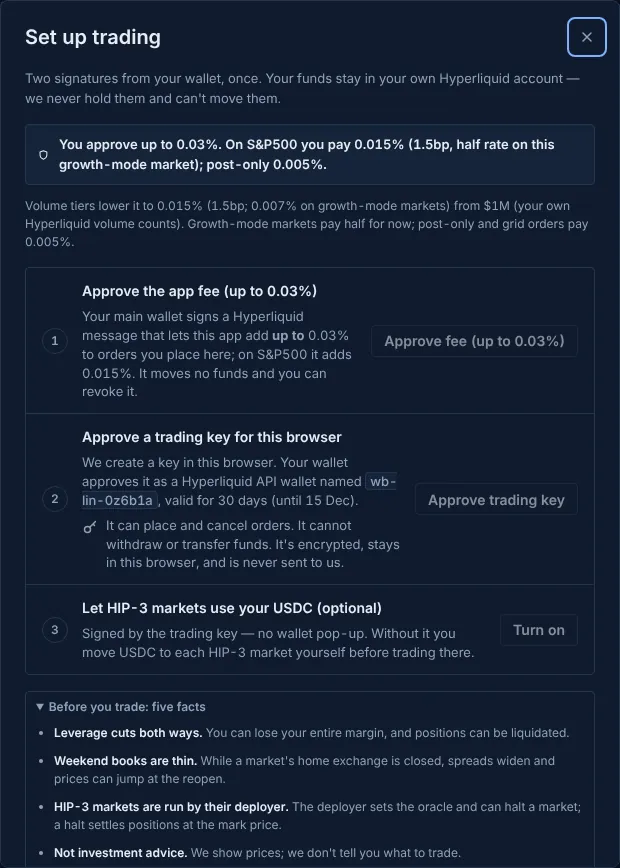
Hyperliquid needs your main wallet to approve two things before an app can trade for you. The terminal asks for both in one sheet, once. After that your orders are signed in the browser and your wallet doesn't pop up again until the key expires.
The two signatures#
- Approve the app fee (up to 0.03%). Your wallet signs a Hyperliquid message that lets KerbTape add a builder fee of at most 0.03% (3bp) to orders you place through the terminal. Hyperliquid enforces the maximum: an order can never carry more. It moves no funds, and you can revoke it on Hyperliquid. What a trade actually pays depends on your tier and the market (Builder fees).
- Approve a trading key for this browser. The terminal creates a key in your browser and your wallet approves it as a Hyperliquid API wallet, valid for 30 days. The setup sheet shows the name it will carry before you sign.
Enable trading · 2 signatures runs both, back to back. You can also do them one at a time from the numbered rows. When both are done the sheet stays open and its title changes to Ready to trade: it lists the fee you approved and the trading key's end date, and says what to do next. If an order was waiting (from a link or the ticket), the sheet closes and that order's confirm sheet comes next.
What the trading key can and can't do#
- It can place and cancel orders and change leverage on your account.
- It cannot withdraw, or send funds to anyone else. Hyperliquid lets an API wallet move USDC only between your own balances (main perps, spot, a market group), and KerbTape never asks it to: moves are signed by your wallet.
- It is encrypted, stays in this browser, and is never sent to KerbTape. Another browser or device needs its own key (one more signature there).
- Remove trading key from this browser in the setup sheet deletes it. When it expires, the next order says so and asks for one signature to approve a new one.
Where your USDC is#
The Ready to trade sheet also shows your Hyperliquid account mode. On a standard account it lists each balance (main perps, the stock markets, spot) with Move USDC and Switch to a unified account; see where your USDC lands. Setup itself never moves funds or changes the mode. (Hyperliquid discontinued the older "DEX abstraction" setting, so there is no third setup step any more.)
Founding members: one signature#
While a Founding member's app fee is waived, there's no fee to approve. Setup then needs only the trading key, and the button says Enable trading · 1 signature. When the waiver ends, the first order after it asks for the fee approval: one signature, up to 0.03%. Closing orders (reduce-only) keep working before you approve it.
The five facts#
The first time, the sheet lists five facts and asks you to tick that you understand them: leverage cuts both ways; weekend books are thin; HIP-3 markets are run by their deployer, who can halt a market; this is not investment advice; and KerbTape never holds your funds. Visitors from some regions see one more line about their region.
If you came through an invite link#
When you arrived through someone's referral link, the trading key's name records the invite, so no extra signature is needed. If the code is too long for the name, the sheet offers Record the invite · 1 signature instead. The sheet may also mention Hyperliquid's own referral discount, which you enter on Hyperliquid's site; on orders placed in the terminal the app fee takes its place, so it lowers nothing there.
Updated . These pages describe what the product does. They are not investment advice and say nothing about where any price goes next.