- Docs
- The terminal
Order ticket
Side, order type, size presets, leverage, TP/SL, reduce-only and post-only.
On this page
The ticket is the right-hand column of the desk (the Trade tab on a phone). Everything it sends goes through the same checks as the command line and hotkeys.
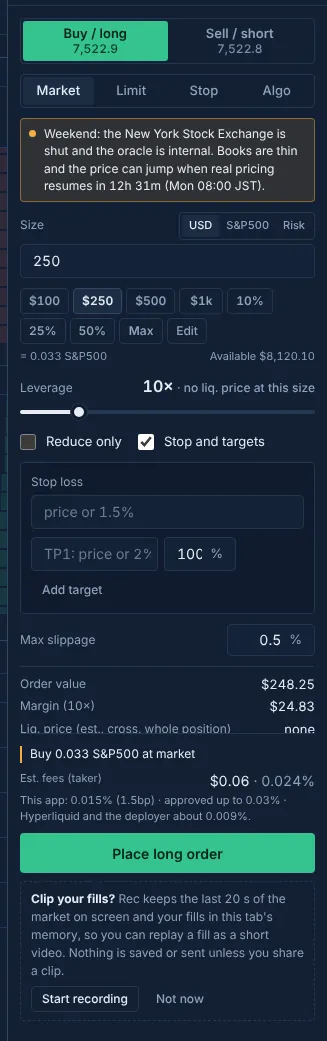
Tabs above the ticket switch it between Order, the Grid builder and the Carry ticket (grid, carry).
Side and order type#
- Side: Buy / long or Sell / short. Each button shows the price you would meet now (best ask or best bid).
- Type: Market, Limit, Stop or Algo.
- Market orders fill at once within a slippage cap (Max slippage, 0.5% by default).
- Limit orders rest at your price. Click the chart or the book to fill the price in, or press Mid. Prices are rounded to the market's tick size, and the ticket says when it rounded.
- Stop orders trigger on the mark price.
- Algo opens a list: Chase, Scale, TWAP, Iceberg, Trailing stop, Conditional, At reopen, Flatten before reopen (Order types and algos).
Size and presets#
- Units: USD (notional), the market's own units, or Risk. Risk sizes the order from your stop: size = risk ÷ distance to the stop, in % of equity or dollars. Choosing Risk turns the stop on.
- Presets: $100, $250, $500, $1k, 10%, 25%, 50% and Max by default. A % preset is a share of the margin available to trade on that side, times your leverage. Max uses 98% of it, leaving room for fees and slippage.
- Edit changes the presets: up to 8, each a dollar amount (
250,1k) or a percentage (25%,max). They're kept in this browser. - The last size you placed on a market stays in the field after the order and comes back next time you open that market.
Leverage#
The slider starts at your account's leverage on that market. Hyperliquid has one leverage per market, so:
- With an open position the ticket keeps the position's leverage. If you move the slider it says the order would change the position's leverage, and the order goes through the confirm sheet.
- Closed-market default: on a market whose home exchange is closed, with no position, a new order starts at 3× when your account leverage there is above 5×. Hyperliquid's own account default is often 20×, and weekend books are thin. A leverage you pick on the slider wins for that market until you reload.
- You can change or turn off the closed-market default in Risk controls and the off switch. It is never applied to a market where you hold a position.
- The margin mode (cross or isolated) of an open position is kept.
Stop and TP levels#
Tick Stop and targets to attach exits to the entry (bracket):
- The stop is a price or a percentage from the entry (
1.5%). - Add up to four TP levels, each with a share of the size. Shares split evenly when you add one.
- With one TP, Hyperliquid holds both exits from the start. With two or more, this browser places the stop after each entry fill (up to about 3 seconds later) and resizes it as TP levels fill; the preview says so.
To add or change the stop or TP on a position you already hold, use the TP/SL editor in Positions (Positions and TP/SL editing).
Reduce-only#
Reduce only makes the order reduce-only: it can only shrink your position, never open one or flip it. Closes, stops on a position and the TP/SL editor's orders are always reduce-only.
Post-only#
A post-only order only rests on the book; if it would fill at once, Hyperliquid cancels it instead. The ticket has no post-only switch. Post-only orders come from:
- the command line:
poston a limit (buy 1000$ at -0.2% post), orbestfor a post-only limit at your own side of the book; - the price ladder's Post switch;
- chase and stalk (always post-only), and
poston scale and iceberg; - the grid (every level is post-only).
Post-only and grid orders pay the lower post-only builder fee (0.5bp; Builder fees).
The summary#
Before you place, the ticket shows the estimated fees (this app's fee and Hyperliquid's), the order value, the margin at your leverage, an estimated liquidation figure (cross or isolated, for the whole position when you already hold one), and with a stop the loss at the stop. On a closed market it also says when real pricing resumes. Positions show Hyperliquid's own liquidation figure once the order fills.
Updated . These pages describe what the product does. They are not investment advice and say nothing about where any price goes next.