- Docs
- The terminal
Positions and TP/SL editing
The Account dock: positions, orders, fills, algos, TP/SL, sub-accounts.
The account dock under the chart has your positions, orders, fills and running algos. On a phone it is the Account tab.
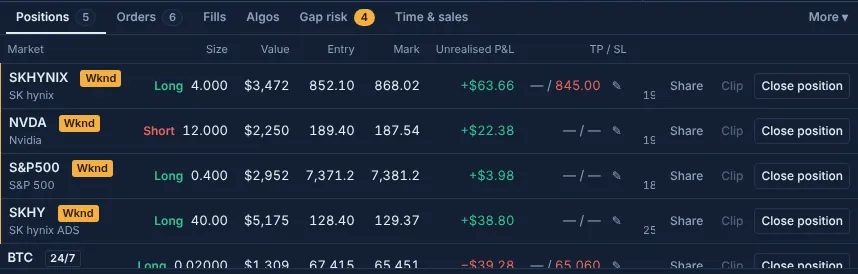
Positions#
Columns: Market, Session, Size, Value, Entry, Mark, Unrealised P&L, TP / SL, Liq. price, Funding, Margin.
- Liq. price is Hyperliquid's own figure, with how far the mark is from it.
- Funding is the funding received (+) or paid (−) since the position opened.
- Session shows whether the market's home exchange is closed and when real pricing resumes.
- The close button closes the position with a reduce-only market order. A position on a closed market also shows its gap risk (Liquidations at the reopen).
Editing TP / SL on a position#
The TP / SL column shows the position's open reduce-only triggers (with +N when there are more).
The pencil opens an inline editor under the row:
- Type a TP level, a stop level, or both. Leave a field empty for none.
- Save. The new trigger goes through the same checks as any order (guard, rolling budget, confirm sheet).
- The old one goes only after the new one is resting. The editor cancels a replaced trigger only once Hyperliquid confirms the new one. If the new one is refused, the old one stays and the editor shows Hyperliquid's reason.
If the answer is late
When Hyperliquid's answer doesn't arrive in time, the button says Checking… and the editor keeps looking for the new trigger. If it can't tell, it says you may have two stops and names both prices, so you can check your open orders. It never leaves you without a stop silently.
Orders, fills and algos#
- Orders: Market, Type, Size, Price, Trigger, Placed, with a cancel button per order.
- Fills: your fills on Hyperliquid, newest first.
- Algos: every running algo with Progress, Status, Slippage, Started and a stop button. Slippage is measured against the price when the algo started.
Closing everything#
close allornuke positionscloses every position;cancel allornuke orderscancels every order and stops every algo.- Alt+Shift+F (or Flatten in Accounts) flattens the account you trade as: it always opens the confirm sheet, then cancels every order and closes every position at market, reduce-only.
Updated . These pages describe what the product does. They are not investment advice and say nothing about where any price goes next.