- Docs
- The terminal
DOM / price ladder
The price ladder: click to place, drag to move, keyboard control.
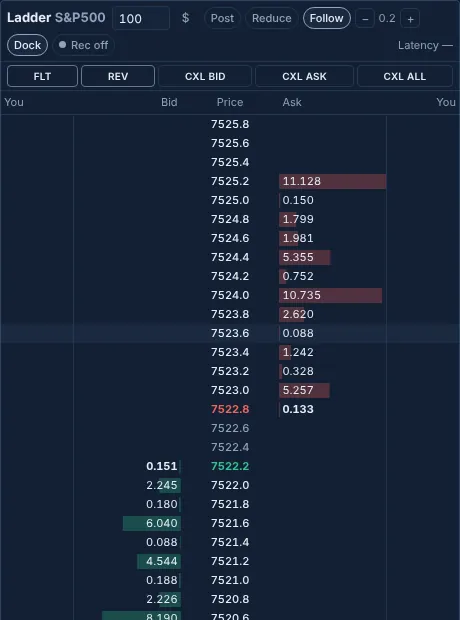
The price ladder (DOM) is a vertical book with one row per price: your bids · bid size · price · ask size · your offers. Open it from the Ladder tab in the account dock.
Mouse#
- Click a bid cell for a limit order on the long side at that row; click an ask cell for the short side. The size is the ladder's size field ($ or units).
- Click one of your orders (the You columns) to cancel it.
- Drag one of your orders to another row to move it. Moving is paused at launch (Moving orders).
- Shift-click a row for a reduce-only stop at that price for the ladder size; Ctrl/⌘-click for a stop on your whole position. The row must be on the losing side of your position; these stops trigger on mark.
- The wheel scrolls; right-clicking the price column recenters.
Controls#
The bar on top holds the ladder's size (in $ or units), Post and Reduce switches that make ladder orders post-only or reduce-only, Follow, the row grouping (− and +), and Tall.
| Button | Runs |
|---|---|
| FLT | close on the ladder's market |
| REV | reverse (always confirms) |
| CXL BID | cancel buys |
| CXL ASK | cancel sells |
| CXL ALL | cancel (this market) |
| Tall | Pops the ladder out to the full window height for more rows; Esc docks it. |
Keyboard#
Click the ladder to focus it, then:
| Key | Does |
|---|---|
| ↑ ↓ | Move the cursor row (past the edge, the ladder scrolls and stops following). |
| PgUp PgDn | Scroll 10 rows. |
| B / S | Limit order on the long / short side at the cursor row. |
| M then Enter | Pick up your order(s) at the cursor, move the cursor, drop them on the new row. Esc puts them down. Paused at launch. |
| Del / Backspace | Cancel your orders at the cursor. |
| Space / C | Recenter on the price. |
| [ / ] | Coarser / finer row grouping. |
| F | Follow the price, or freeze the ladder where it is. |
Safety#
- Every ladder order goes through the command line, the guard, the rolling budget and the confirm sheet, like a hotkey.
- A price that crosses the book, every order from a touch screen, and every drag of more than 5% open the confirm sheet.
- Repeated clicks on the same cell within 350 ms count once, and only one send per row and side is in flight.
- A book that hasn't updated for 3 seconds greys the ladder out and refuses clicks and keys until it updates. The footer shows its age.
Updated . These pages describe what the product does. They are not investment advice and say nothing about where any price goes next.