- Docs
- The terminal
Order book
The L2 book: price grouping, size units, depth and the imbalance bar.
On this page
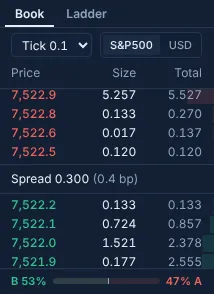
The order book shows Hyperliquid's resting orders (L2): up to 20 price levels on each side, asks above, bids below, the spread in the middle. On wide screens it sits beside the chart; otherwise open the Book tab in the dock.
Price grouping#
The grouping menu merges nearby prices into wider levels. Hyperliquid does the grouping on its side, so the 20 levels then cover a wider range. While grouped, the middle line shows the group size instead of the spread, and clicking a level still uses a real price for the ticket.
Sizes and depth#
- Switch sizes between the market's own units and USD.
- Each level shows its size and the cumulative size from the touch, with depth bars.
- Click a level to copy its price into the ticket. (Not on a pre-IPO market.)
The imbalance bar#
The bar under the book compares the resting size on each side over the top 10 levels: B 62% means 62% of
that displayed size is on the bid side. It counts displayed size only, and it changes as orders are placed and pulled.
It describes the book now; it isn't a forecast.
For a clickable, row-by-row book with your own orders in it, use the price ladder.
Updated . These pages describe what the product does. They are not investment advice and say nothing about where any price goes next.