- Docs
- The terminal
One-click trading
Market orders at a preset size in one click, and the rules that still apply.
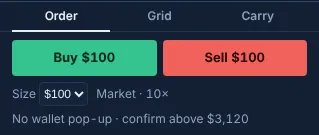
One-click trading sends a market order at a preset size with a single click: on a computer from the bar above the ticket, on a phone from the quick-trade bar under the chart.
Turning it on#
Before setup the bar says Set up one-click trading. After the one-time setup each click is signed by your trading key: no wallet pop-up.
- Desktop: pick a size in the Size menu; the two buttons show it (for example Buy $100 and Sell $100). The line under them shows the leverage and the confirm cap.
- Phone: the quick-trade bar under the chart has size chips and the same two buttons (phone layout).
- The sizes come from your ticket presets (Order ticket).
What still applies#
One click skips the ticket, not the checks:
- The first one-click order in this browser opens the confirm sheet.
- The confirm sheet also opens whenever the order flips a position, adds more than the confirm cap, names an ambiguous ticker for the first time, or would change the leverage of an open position.
- The rolling budget counts one-click orders with hotkeys and the command line.
- The daily loss lockout, when you turned it on, refuses opening orders.
- One order per click. Each side locks from the click until the send settles, then cools down for 1.5 seconds; the button says Sent · 1.2 s meanwhile. A double-click or a held key never sends twice.
- While the outcome of an order with a lost answer is being looked up, no one-click order is sent on that market.
- The size is rounded down to the market's lot, and every order must be at least $10.
- There is no one-click bar on a pre-IPO market.
Keys instead of clicks#
The trading pack binds market orders at a size you pick to Alt+Shift+B and Alt+Shift+S, plus close, reverse and cancel keys. It stays off until you arm it: see Hotkeys reference.
Updated . These pages describe what the product does. They are not investment advice and say nothing about where any price goes next.