- Docs
- The terminal
Risk controls and the off switch
The confirm cap, the daily loss lockout, closed-market leverage, flatten, and when trading is switched off.
On this page
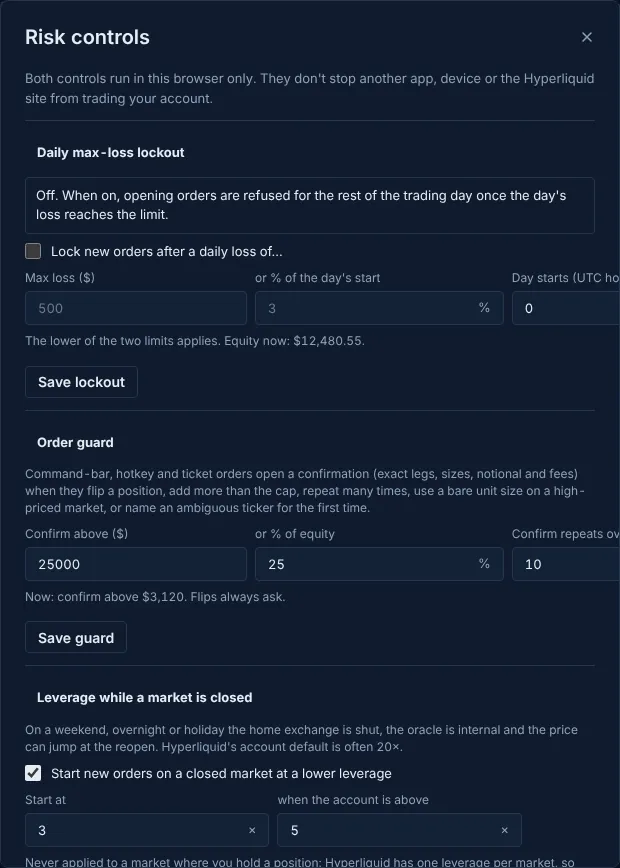
Open Loss limit and order guard in the account dock. Every control here runs in this browser only: it doesn't stop another app, device or Hyperliquid's own site from trading your account.
The confirm cap#
Command-bar, hotkey, one-click and ticket orders open a confirmation (exact legs, sizes, notional and fees) when they flip a position, add more than the cap, repeat many times, use a bare unit size on a high-priced market, or name an ambiguous ticker for the first time.
- Confirm above ($): $25,000 by default; or % of equity: 25% by default. The lower of the two applies.
- Confirm repeats over: 10 by default.
- The same cap covers a rolling 60 seconds of everything sent without a confirm, so a run of small orders can't add up past it.
Daily max-loss lockout#
Off by default. Turn it on with a dollar loss or a percentage of the day's starting value, and the hour (UTC) your day starts. Once the day's loss reaches the limit, opening orders are refused for the rest of that day. Closing and cancelling always work.
While locked you can only tighten the limit. Raising it, switching it off or moving the day start waits until the lock lifts, and the engine refuses those changes too.
Leverage while a market is closed#
On a weekend, overnight or holiday the home exchange is shut, the oracle is internal and the price can jump at the reopen. So by default a new order on a closed market starts at 3× when your account leverage there is above 5×. Change the default and the threshold here, or turn it off. It is never applied to a market where you hold a position: the ticket keeps that position's leverage and asks you to confirm a change.
Flatten and cancel everything#
- Alt+Shift+F flattens the account you trade as, always through the confirm sheet: every order cancelled, every position closed at market, reduce-only.
nuke orderscancels every order and algo;nuke positionscloses every position;cancel allandclose alldo the same from the command line.flatten before reopen 15mcloses positions shortly before their markets reopen (Order types and algos).
The off switch#
- Automation: the Automation workspace has a kill switch for the opt-in server runner, with a typed confirmation. It stops what runs on the server.
- Trading switched off: a terminal build can have trading off for a network. Then prices stay live, but no signature is asked for and every place, cancel or setup button says Trading is switched off for mainnet in this build. Prices are live. (or testnet). Positions you already hold stay on Hyperliquid, where you can manage them on Hyperliquid's own site.
- Moving orders can be paused separately; it is paused at launch (Moving orders).
Updated . These pages describe what the product does. They are not investment advice and say nothing about where any price goes next.