- Docs
- The terminal
Hotkeys reference
Every key the terminal knows, the trading pack, and how to bind your own.
On this page
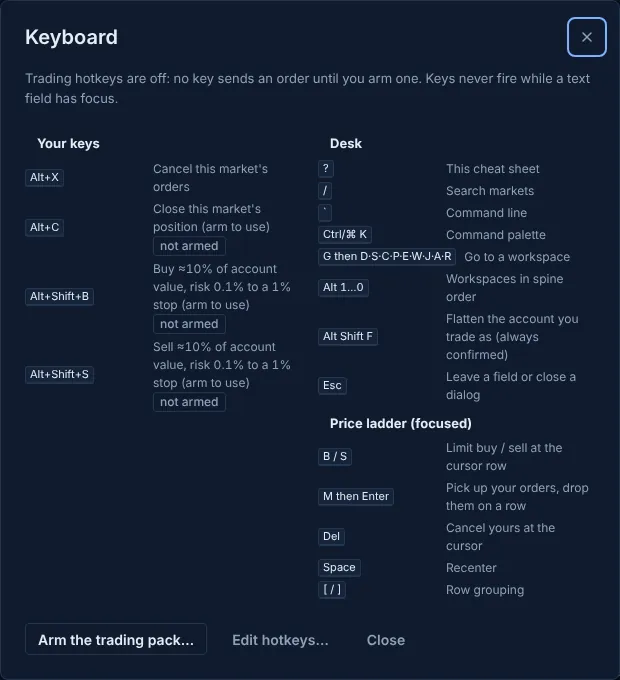
Press ? in the terminal for a one-screen cheat sheet of every key that works right now, including your own.
Desk keys#
These work anywhere on the desk, except while you type in a field (press Esc or Tab to leave it).
| Keys | Does |
|---|---|
| ? | This cheat sheet |
| / | Search markets |
| ` | Command line |
| Ctrl/⌘ K | Command palette |
| G then D·S·C·P·E·W·J·A·R | Go to a workspace |
| Alt 1…0 | Workspaces in spine order |
| Alt Shift F | Flatten the account you trade as (always confirmed) |
| Esc | Leave a field or close a dialog |
G then a letter#
| Keys | Workspace |
|---|---|
| G A | Alerts |
| G R | Automation |
| G C | Crypto |
| G D | Desk |
| G E | Earnings |
| G X | Edges |
| G F | Flow |
| G J | Journal |
| G S | Scanner |
| G P | Spreads |
| G W | Whales |
Alt+1 … Alt+0 open the first ten workspaces in spine order: Desk, Scanner, Crypto, Spreads, Earnings, Edges, Flow, Whales, Journal, Alerts.
Keys a binding can't take#
The desk owns these, so a binding on any of them is refused:
| Key | Used for |
|---|---|
| / | Search markets |
| ` | Focus the command bar |
| ? | Hotkeys |
| Shift+? | Hotkeys |
| Alt+1 | Desk workspace |
| Alt+2 | Scanner workspace |
| Alt+3 | Spreads workspace |
| Escape | Leave a field or close a dialog |
| Alt+4 | Workspace 4 |
| Alt+5 | Workspace 5 |
| Alt+6 | Workspace 6 |
| Alt+7 | Workspace 7 |
| Alt+8 | Workspace 8 |
| Alt+9 | Workspace 9 |
| Alt+0 | Workspace 10 |
| Alt+Shift+F | Flatten the account you trade as (always confirmed) |
| Ctrl+K | Command palette |
| Meta+K | Command palette |
Bindings out of the box#
Only Alt+X (cancel) works from the start. The order templates are on two-modifier combos and stay disarmed until you arm them. The long/short templates size to about 10% of account value (0.1% risk to a 1% stop), below the confirm cap.
| Keys | Command | Label | Out of the box |
|---|---|---|---|
| Alt+X | cancel | Cancel this market's orders | works |
| Alt+C | close | Close this market's position (arm to use) | arm to use |
| Alt+Shift+B | buy risk 0.1% stop 1% | Buy ≈10% of account value, risk 0.1% to a 1% stop (arm to use) | arm to use |
| Alt+Shift+S | sell risk 0.1% stop 1% | Sell ≈10% of account value, risk 0.1% to a 1% stop (arm to use) | arm to use |
The trading pack#
Offered once after setup (and from the cheat sheet): pick a size, tick that you understand these keys send real orders, and the pack's keys are bound and armed together. "Not now" leaves every order key off. Sizes offered: $100, $250, $500, $1,000.
| Keys | Command | Does |
|---|---|---|
| Alt+Shift+B | buy <size>$ | Market buy of the size you picked, on the selected market |
| Alt+Shift+S | sell <size>$ | Market sell of the size you picked, on the selected market |
| Alt+C | close | Reduce-only market close of the selected market's position |
| Alt+Shift+R | reverse | Flip the selected market's position at market (always asks to confirm: it's a flip) |
| Alt+X | cancel | Cancel your open orders on the selected market (sends no order) |
Price ladder keys#
When the ladder has focus (full list):
| Keys | Does |
|---|---|
| B / S | Limit buy / sell at the cursor row |
| M then Enter | Pick up your orders, drop them on a row |
| Del | Cancel yours at the cursor |
| Space | Recenter |
| [ / ] | Row grouping |
Binding your own#
bind ctrl+1 "buy 1000$ best"          for the current market
bind global F2 "cancel all"            everywhere
bind list · unbind ctrl+1 · unbind all- Modifiers are ctrl, meta (cmd), alt (option) and shift. Keys are letters, digits, F1–F24, Space, the arrows, Escape and so on.
- A binding for one market beats a global one on that market.
- Keys never fire while you type in a field, and holding a key down doesn't repeat the order.
- Order keys are off until armed. A binding whose command can send an order, or change leverage, does
nothing until you arm it in Hotkey settings, which shows its size at your current equity. Editing the command disarms
it. Commands that never send an order (
cancel,lev,leverage,switch,help,tasks,kill,print,set,unset,alias,unalias,bind,unbind,sleep) work without arming. - An armed key still goes through the guard: a flip or an over-cap order opens the confirm sheet and is never confirmed by the key press itself.
- Bindings live in this browser. Hotkey settings can save named profiles (up to 20) and export or import them as a JSON file; imported bindings always arrive disarmed.
Keys the browser keeps#
Binding one of these gets a warning, because the browser usually handles it first:
| Key | The browser… |
|---|---|
| Ctrl+W | closes the tab |
| Meta+W | closes the tab |
| Ctrl+T | opens a tab |
| Meta+T | opens a tab |
| Ctrl+N | opens a window |
| Meta+N | opens a window |
| Ctrl+Tab | switches tabs |
| Ctrl+Shift+Tab | switches tabs |
| Ctrl+L | focuses the address bar |
| Meta+L | focuses the address bar |
| Ctrl+R | reloads (and stops browser algos) |
| Meta+R | reloads (and stops browser algos) |
| F5 | reloads (and stops browser algos) |
| F11 | full screen |
| F12 | developer tools |
| Meta+Q | quits the browser |
| Alt+F4 | closes the window |
| Ctrl+Shift+W | closes the window |
| Ctrl+Shift+Q | quits the browser |
Updated . These pages describe what the product does. They are not investment advice and say nothing about where any price goes next.